DS-P7001-04

DS-P7001-04

$1,899.99
Skip to product information
DS-P7001-04
Out of stock

DS-P7001-04

$1,899.99

4port GPON OLT

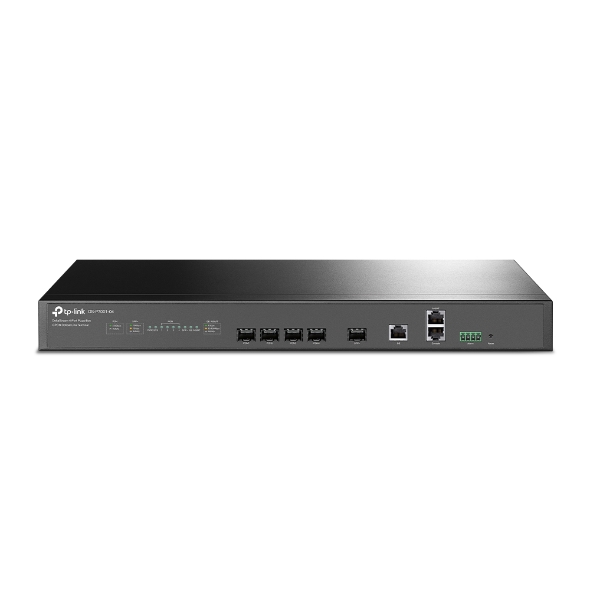
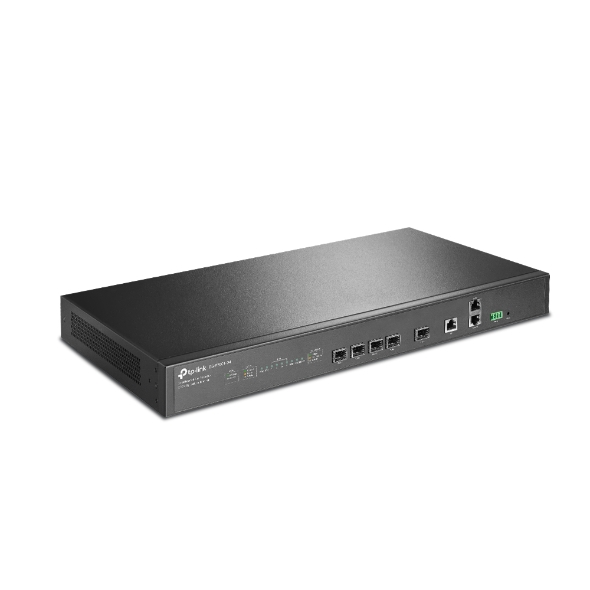
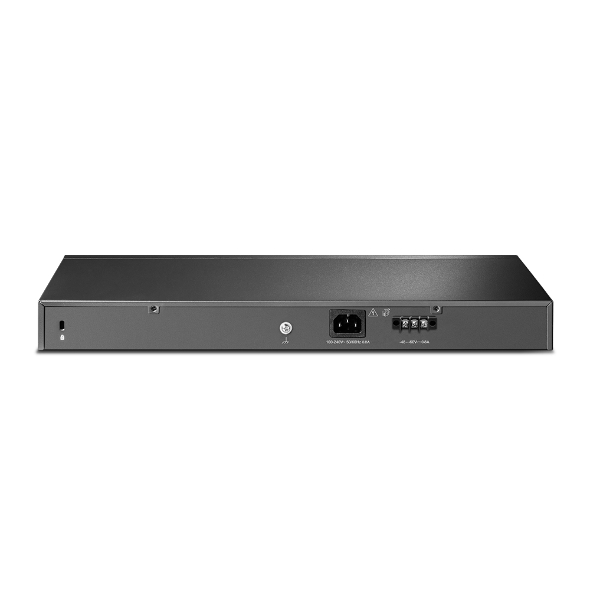
4port GPON OLT Broadcom Chipset SPEC:4x SFP GPON ports, 1x 10Gbps SFP+ uplink ports, 1x Gigabit RJ45 uplink port?1x RJ45 Console port, 1x Gigabit RJ45 Manage port, Buildin redundancy power, AC+DC power input

4port GPON OLT

4 GPON Ports: Supports 1:128 splitting ratio for every port—up to 512 ONTs by one device. High-Speed Uplink Ports: Provides 1× 10GE SFP+ port and 1× gigabit uplink port. Redundant Dual Power Supplies: Carrier-class reliability with dual built-in AC+DC power supplies. Complete L2 & Advanced L3 Functions: Satisfies the need for numerous commercial requirements. Centralized Management: Via DeltaStream PON Management System (DPMS), SNMP, CLI, and WEB UI. Advanced L2/L2+ Functions: Static Routing, IGMP Snooping, and more meet the requirement for different applications.
Fabricant TP-Link
Modèle DS-P7001-04
UPC 840030703164
Catégorie Networking — Switches 4 to 10 Ports
Poids 7.2 lbs
Dimensions (boîte) 4.2" × 13.2" × 20.8" (L×P×H)

Specifications

General

Interface • 4× 2.5G PON Ports• 1× 10 Gbps SFP+ Uplink Port• 1× 10/100/1000 Mbps RJ45 Uplink Port• 1× RJ45 Console Port• 1× RJ45 MGMT Port• 1× Alarm Port (Reserved)
Button Reset Button
Power Supply Dual Power Supplies • AC: 100V~240V, 50/60Hz• DC: -38.4V~-72V
Max. Power Consumption Max. 58W
Dimensions ( W x D x H ) 17.3 × 7.1 × 1.7 in (440 × 180× 44 mm)
Security • ACL• 802.1x Authentication• ARP Inspection• IP Source Guard
DHCP • DHCP Server• DHCP Relay
OMCI Standard OMCI Management Supported
ONU Authentication ONU Auto Authentication
ONU Security • Rouge ONU Detection and Isolation• Uplink and Downlink Data Encryption
Multi-Service Multi-Service Traffic Identify and Rate Limit
QoS • IEEE 802.1p/DSCP QoS• Voice VLAN• Auto VoIP
Routing Static Routing
Mulitcast • IGMP Snooping• MLD Snooping
Centralized Management • Large-Scale Devices Management• OLT Batch Configure, Upgrade, Reboot• Multi-Site Management• Intelligent Network Monitoring• Real-time Network Overview
Max. Splitting Ratio 1:128
Transmission distance 20km
Data rate • Downstream: 2.5 Gbps• Upstream: 1.25 Gbps
Wave Length • Tx: 1490 nm• Rx: 1310 nm
Interface type SC/UPC
Fiber type 9/125μm SMF (Single Mode Fiber)
Tx power Class C+
Certification CE,FCC
Package Content • OLT Device • Power Cord and Console Cable• Installation Guide• Mouting Brackets, Screws and Rubber Feet
Environment • Operating Temperature: 0°C~50°C (32°F~122°F)• Storage Temperature: -40℃~70℃(-40°F ~158°F)
ProductProductProductProductProductProduct
General
Interface • 4× 2.5G PON Ports• 1× 10 Gbps SFP+ Uplink Port• 1× 10/100/1000 Mbps RJ45 Uplink Port• 1× RJ45 Console Port• 1× RJ45 MGMT Port• 1× Alarm Port (Reserved)
Button Reset Button
Power Supply Dual Power Supplies • AC: 100V~240V, 50/60Hz• DC: -38.4V~-72V
Max. Power Consumption Max. 58W
Dimensions ( W x D x H ) 17.3 × 7.1 × 1.7 in (440 × 180× 44 mm)
Security • ACL• 802.1x Authentication• ARP Inspection• IP Source Guard
DHCP • DHCP Server• DHCP Relay
OMCI Standard OMCI Management Supported
ONU Authentication ONU Auto Authentication
ONU Security • Rouge ONU Detection and Isolation• Uplink and Downlink Data Encryption
Multi-Service Multi-Service Traffic Identify and Rate Limit
QoS • IEEE 802.1p/DSCP QoS• Voice VLAN• Auto VoIP
Routing Static Routing
Mulitcast • IGMP Snooping• MLD Snooping
Centralized Management • Large-Scale Devices Management• OLT Batch Configure, Upgrade, Reboot• Multi-Site Management• Intelligent Network Monitoring• Real-time Network Overview
Max. Splitting Ratio 1:128
Transmission distance 20km
Data rate • Downstream: 2.5 Gbps• Upstream: 1.25 Gbps
Wave Length • Tx: 1490 nm• Rx: 1310 nm
Interface type SC/UPC
Fiber type 9/125μm SMF (Single Mode Fiber)
Tx power Class C+
Certification CE,FCC
Package Content • OLT Device • Power Cord and Console Cable• Installation Guide• Mouting Brackets, Screws and Rubber Feet
Environment • Operating Temperature: 0°C~50°C (32°F~122°F)• Storage Temperature: -40℃~70℃(-40°F ~158°F)

Contents not available.

Pour les questions fréquentes, consultez le centre d'aide Ubiquiti :

❓ Centre d'aide Ubiquiti

You may also like