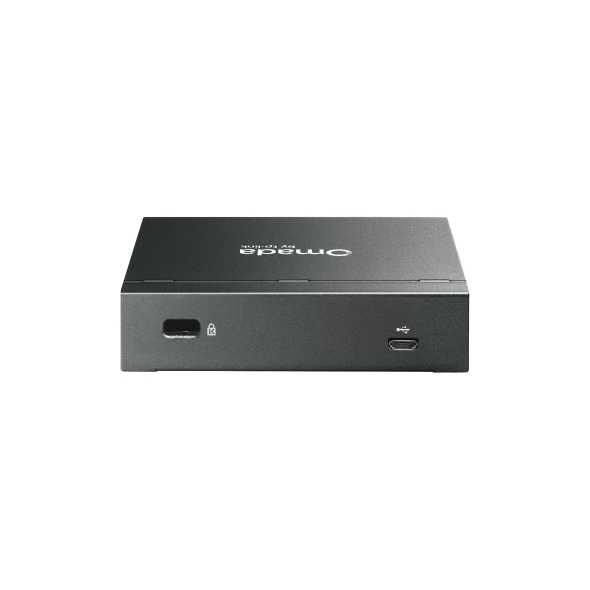
OC220

OC220

$149.99
Skip to product information
OC220
Out of stock

OC220

$149.99

Omada Hardware Controller

Omada Hardware Controller PORT: 2x 10/100/1000 Mbps Ethernet Ports, 1x USB 2.0 Port, 1x Micro USB Port FEATURE: Cloud Access, Centralized Management for up to 100 Omada EAPs + 20 Omada switches + 10 Omada gateways, Powered by 802.3af / at PoE or Micro-USB Power Adapter, Omada App, Metal casing

Omada Hardware Controller

Manage up to 130 Devices* No Need for a Running PC/Server Optional Cloud with No License Fees Manage via Omada App Flexible 802.3af PoE or Micro USB Power Supply Durable Metal Casing Fanless for Silent Operation USB Port for Data Backup Remotely or locally manage up to 100 Omada access points, 10 gateways, 20 switches, and two DeltaStream GPON OLTs via the Omada App or Web UI.* Remotely control the whole network wherever you are in the world

Highlights

  • Free Cloud Access
  • On-Premises Management
Fabricant TP-Link
Modèle OC220
UPC 840460601115
Catégorie Networking Wireless Dual Band — APs & Bridges
Poids 1 lbs
Dimensions (boîte) 5.5" × 5.1" × 2.8" (L×P×H)

Specifications

General

Interface • 2× Gigabit Ethernet Ports• 1× USB 2.0 Port• 1× Micro USB Port
Power Supply • 802.3af PoE• Micro USB(DC 5V/Minimum 1A)
Dimensions ( W x D x H ) 3.9×3.9×1.0 in (100×98×25 mm)
Omada App Yes
Centralized Management • 100 Omada access points• 10 Omada gateways• A maximum of 20 Omada switches*• A maximum of two select DeltaStream GPON OLTs*Note: Please refer to www.omadanetworks.com/en/business-networking/all-omada/ to find all the Omada device models supported by OC220*†The number of supported Omada switches decreases by five for each DeltaStream GPON OLT added. Refer to https://www.omadanetworks.com/omada-sdn/product-list/#sp-gpon to find all the DeltaStream GPON OLTs that are supported by the controller.
Cloud Access Yes
L3 Management Yes
Multi-site Management Yes
Management Features • Automatic Device Discovery • Batch Configuration• Batch Firmware Upgrading • Intelligent Network Monitoring• Abnormal Event Warnings• Unified Configuration• Reboot Schedule• Captive Portal Configuration
Certification CE, FCC, RoHS
Package Content • Omada Hardware Controller OC220• Quick Installation Guide • RJ45 Ethernet Cable
System Requirements Windows 7/8/10/11, Vista™, XP or MAC® OS, NetWare®, UNIX® or Linux
Environment • Operating Temperature: -5–50 ℃ (23–122 ℉)• Storage Temperature: -40–70 ℃ (-40–158 ℉)• Operating Humidity: 10–90% RH non-condensing• Storage Humidity: 5–90% RH non-condensing
ProductProductProductProductProductProduct
General
Interface • 2× Gigabit Ethernet Ports• 1× USB 2.0 Port• 1× Micro USB Port
Power Supply • 802.3af PoE• Micro USB(DC 5V/Minimum 1A)
Dimensions ( W x D x H ) 3.9×3.9×1.0 in (100×98×25 mm)
Omada App Yes
Centralized Management • 100 Omada access points• 10 Omada gateways• A maximum of 20 Omada switches*• A maximum of two select DeltaStream GPON OLTs*Note: Please refer to www.omadanetworks.com/en/business-networking/all-omada/ to find all the Omada device models supported by OC220*†The number of supported Omada switches decreases by five for each DeltaStream GPON OLT added. Refer to https://www.omadanetworks.com/omada-sdn/product-list/#sp-gpon to find all the DeltaStream GPON OLTs that are supported by the controller.
Cloud Access Yes
L3 Management Yes
Multi-site Management Yes
Management Features • Automatic Device Discovery • Batch Configuration• Batch Firmware Upgrading • Intelligent Network Monitoring• Abnormal Event Warnings• Unified Configuration• Reboot Schedule• Captive Portal Configuration
Certification CE, FCC, RoHS
Package Content • Omada Hardware Controller OC220• Quick Installation Guide • RJ45 Ethernet Cable
System Requirements Windows 7/8/10/11, Vista™, XP or MAC® OS, NetWare®, UNIX® or Linux
Environment • Operating Temperature: -5–50 ℃ (23–122 ℉)• Storage Temperature: -40–70 ℃ (-40–158 ℉)• Operating Humidity: 10–90% RH non-condensing• Storage Humidity: 5–90% RH non-condensing

Contents not available.

Pour les questions fréquentes, consultez le centre d'aide Ubiquiti :

❓ Centre d'aide Ubiquiti

You may also like