TL-SG1016PE

TL-SG1016PE

$189.99
Passer aux informations sur le produit
TL-SG1016PE
En rupture de stock

TL-SG1016PE

$189.99

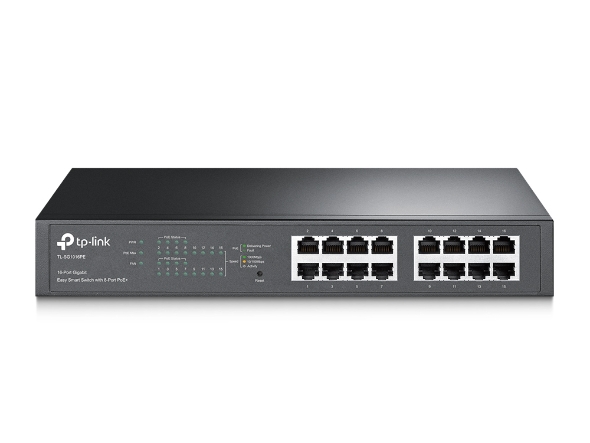
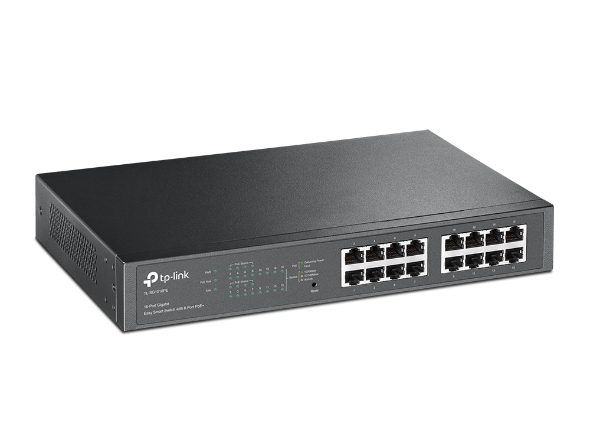
Commutateur de bureau/montable en rack 16 ports Gigabit

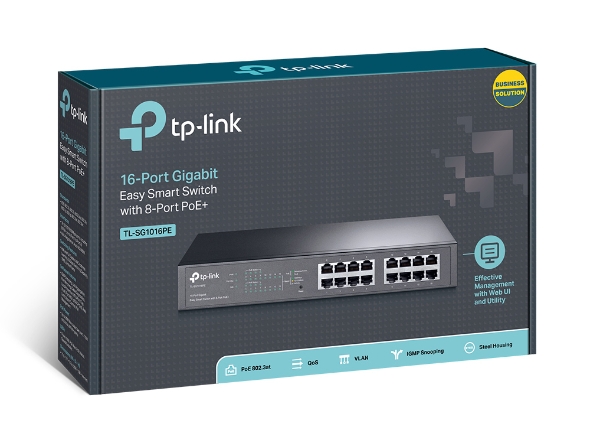
Switch PoE+ Easy Smart JetStream 16 ports Gigabit pour ordinateur de bureau/montage en rack. 16 ports RJ45 Gigabit dont 8 ports PoE+, budget d'alimentation PoE de 150 W, VLAN basé sur MTU/port/balise, QoS, IGMP Snooping, montable en rack, boîtier en acier

Commutateur PoE Easy Smart Gigabit 16 ports TP-Link avec 8 ports PoE+

8 ports du TL-SG1016PE prennent en charge la norme Power over Ethernet Plus (PoE+) qui peut détecter et alimenter automatiquement tout appareil conforme à la norme IEEE 802.3af/at. Dans cette situation, l'énergie électrique est transmise avec les données dans un seul câble, ce qui vous permet d'étendre votre réseau là où il y a des câbles ou des prises électriques, où vous souhaitez installer des appareils tels que des points d'accès, des caméras IP ou des téléphones IP. Le TL-SG1016PE dispose d'une fonction de priorité qui aide à protéger le système lorsque sa puissance est surchargée. Si la consommation électrique de tous les appareils PoE+ est supérieure ou égale à 110 W, une priorité sera établie entre les 16 ports PoE+, moment auquel le système coupera l'alimentation du port de plus faible priorité. *Priorité (port 1 > port 2 > port 3 > port 4 > port 5 > port 6 > port 7 > port 8) : Cette fonction aidera à protéger le système si l'alimentation du système devient surchargée. Par exemple, les ports 1, 2, 3, 4 et 5 utilisent 30 W (la puissance maximale par port est de 30 W), la puissance totale du système est de 110 W (la LED PoE max sera verte si la consommation électrique de tous les PD PoE est >= 110 W). Si un PD supplémentaire est inséré sur le port 4 avec 20 W, le système coupera le port 5 pour protéger le système, ce qui signifie que les ports 1, 2, 3 utiliseront 90 W, et le port 4 utilisera 20 W, et aucune alimentation ne sera fournie au port 5. Le TL-SG1016PE est facile à installer et à utiliser. Il ne nécessite aucune configuration ni installation. Avec son design montable sur bureau/rack, ses performances et sa qualité exceptionnelles, le commutateur de bureau/montable en rack Gigabit 16 ports TP-LINK TL-SG1016PE avec 8 ports PoE est un excellent choix pour étendre votre réseau domestique ou de bureau.
Fabricant TP-Link
Modèle TL-SG1016PE
UPC 845973098865
Catégorie Networking — Switches 12 to 16 Ports
Poids 5.45 lbs
Dimensions (boîte) 9.9" × 15.8" × 3.1" (L×P×H)

Specifications

General

Standards and Protocols IEEE 802.3, IEEE 802.3u, IEEE 802.3ab, IEEE 802.3x, IEEE 802.1q, IEEE 802.1p
Interface 16 10/100/1000Mbps RJ45 PortsAUTO Negotiation/AUTO MDI/MDIX
Network Media 10BASE-T: UTP category 3, 4, 5 cable (maximum 100m)EIA/TIA-568 100Ω STP (maximum 100m)100BASE-TX: UTP category 5, 5e cable (maximum 100m)EIA/TIA-568 100Ω STP (maximum 100m)1000BASE-T: UTP category 5, 5e, 6 or above cable (maximum 100m)EIA/TIA-568 100Ω STP (maximum 100m)
Fan Quantity 1
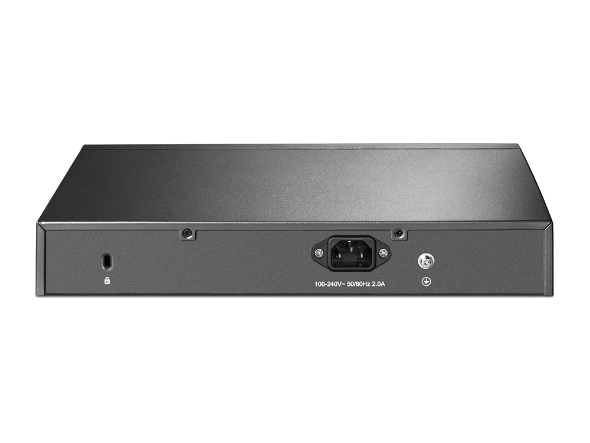
Physical Security Lock Yes
Power Supply 100-240VAC, 50/60Hz
Max. Power Consumption 14.72W (110V/60Hz with no PD connected)131.42W (110V/60Hz with 110W PD connected)
PoE Ports (RJ45) Standard: 802.3 at compliantPoE Ports: Port 1- Port 8PoE Power Budget: 110W
Dimensions ( W x D x H ) 11.6*7.1*1.7 in. (294*180*44 mm)
Mounting Rack Mountable
Max. Heat Dissipation 50.22 BTU/h (with no PD connected)448.41 BTU/h (with 110W PD connected)
Switching Capacity 32Gbps
Packet Forwarding Rate 23.8Mbps
MAC Address Table 8K
Packet Buffer Memory 4.1Mbit
Jumbo Frame 9KB
Quality of Service Support Port-Based/802.1p/DSCP prioritySupport 4 priority queuesRate LimitStorm Control
L2 Features IGMP Snooping V1/V2/V3Link AggregationPort MirroringCable DiagnosticsLoop Prevention
VLAN Supports up to 128 VLANs simultaneously (out of 4K VLAN IDs)MTU/Port/Tag VLAN
Management Features Web-based GUIEasy Smart Configuration Utility
Transmission Method Store-And-Forward
Certification FCC, CE, RoHS
Package Content TL-SG1016PEPower CordInstallation GuideResource CDRackmount KitRubber Feet
System Requirements Microsoft® Windows® for running Utility
Environment Operating Temperature: 0℃~40℃ (32℉~104℉)Storage Temperature: -40℃~70℃ (-40℉~158℉)Operating Humidity: 10%~90% non-condensingStorage Humidity: 5%~90% non-condensing
ProductProductProductProductProductProduct
General
Standards and Protocols IEEE 802.3, IEEE 802.3u, IEEE 802.3ab, IEEE 802.3x, IEEE 802.1q, IEEE 802.1p
Interface 16 10/100/1000Mbps RJ45 PortsAUTO Negotiation/AUTO MDI/MDIX
Network Media 10BASE-T: UTP category 3, 4, 5 cable (maximum 100m)EIA/TIA-568 100Ω STP (maximum 100m)100BASE-TX: UTP category 5, 5e cable (maximum 100m)EIA/TIA-568 100Ω STP (maximum 100m)1000BASE-T: UTP category 5, 5e, 6 or above cable (maximum 100m)EIA/TIA-568 100Ω STP (maximum 100m)
Fan Quantity 1
Physical Security Lock Yes
Power Supply 100-240VAC, 50/60Hz
Max. Power Consumption 14.72W (110V/60Hz with no PD connected)131.42W (110V/60Hz with 110W PD connected)
PoE Ports (RJ45) Standard: 802.3 at compliantPoE Ports: Port 1- Port 8PoE Power Budget: 110W
Dimensions ( W x D x H ) 11.6*7.1*1.7 in. (294*180*44 mm)
Mounting Rack Mountable
Max. Heat Dissipation 50.22 BTU/h (with no PD connected)448.41 BTU/h (with 110W PD connected)
Switching Capacity 32Gbps
Packet Forwarding Rate 23.8Mbps
MAC Address Table 8K
Packet Buffer Memory 4.1Mbit
Jumbo Frame 9KB
Quality of Service Support Port-Based/802.1p/DSCP prioritySupport 4 priority queuesRate LimitStorm Control
L2 Features IGMP Snooping V1/V2/V3Link AggregationPort MirroringCable DiagnosticsLoop Prevention
VLAN Supports up to 128 VLANs simultaneously (out of 4K VLAN IDs)MTU/Port/Tag VLAN
Management Features Web-based GUIEasy Smart Configuration Utility
Transmission Method Store-And-Forward
Certification FCC, CE, RoHS
Package Content TL-SG1016PEPower CordInstallation GuideResource CDRackmount KitRubber Feet
System Requirements Microsoft® Windows® for running Utility
Environment Operating Temperature: 0℃~40℃ (32℉~104℉)Storage Temperature: -40℃~70℃ (-40℉~158℉)Operating Humidity: 10%~90% non-condensingStorage Humidity: 5%~90% non-condensing

Contents not available.

Pour les questions fréquentes, consultez le centre d'aide Ubiquiti :

❓ Centre d'aide Ubiquiti

Vous aimerez peut-être aussi